Introduction
If you're running a manufacturing or processing business, you've probably felt the pain. Manual cutting eats up hours. Traditional die-cutting locks you into expensive molds. And don't get me started on the lead times.
For a complete breakdown of digital cutting technology and how to choose the right machine, read our complete digital cutting machine guide.
Here's the reality: more businesses are switching to digital flatbed cutters every year. Why? Because one machine can replace an entire die library—and cut circles around your old setup in both speed and precision.
That's exactly what this guide is about. We'll walk through what a digital flatbed cutter actually does, where it fits in your production line, and whether it's the right investment for your business in 2026.
Quick Answer
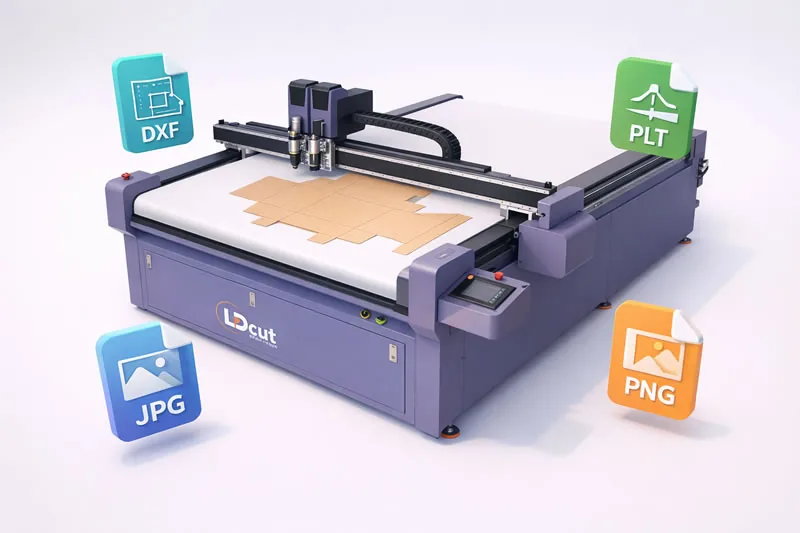
A digital flatbed cutter is a computer-controlled knife-cutting machine that slices cardboard, foam, vinyl, and composites—without dies or molds—following digital files at ±0.1mm accuracy. LDCUT, a China-based digital cutter manufacturer, builds these multi-tool platforms for packaging, signage, and display converters in 80+ countries. Learn more about the LDCUT manufacturer, or for model selection see our digital cutting machine guide.
Digital Flatbed Cutter at a Glance
| Feature | Digital Flatbed Cutter |
|---|---|
| Physical Die | No |
| Materials | Multi-material |
| Cutting Method | Knife-based |
| Best For | Short-run / variable production |
| File Input | DXF, PLT, JPG, TIF |
| Tool | Multiple (oscillating, drag, creasing, V-cut, kiss cut) |
See the full LDCUT digital cutter product line or compare technologies in our digital cutter vs die cutting guide.
Core Specifications of a Digital Flatbed Cutter
Beyond the concept, here are the hard numbers that define a professional digital flatbed cutter platform. The figures below reflect the LDCUT configuration used across most converter installations.
| Specification | L8 / L10 / K8 / K10 (K/L Series) | G6 (Rigid Material Series) |
|---|---|---|
| Platform sizes | 900×1200 / 1300×1300 / 1300×2500 / 1600×2500 mm | 1300×2500 mm |
| Max rapid speed | 120 m/min | 100 m/min |
| Standard head | EOT (Electric Oscillating Tool) | Spindle (40,000–60,000 rpm) + oscillating knife |
| Optional heads | DCT / CCT / KCT / VCT (choose 1) | — |
| Production tier | Sampling + small/medium batch; L10/K10 for automated, heavy-duty work | Rigid materials (PVC, acrylic, composites) |
The Five Most Common Tool Heads
Every LDCUT K/L-series cutter ships with the EOT as standard and supports one optional secondary head. Five heads cover the vast majority of converter work — these are the ones you will actually use:
- EOT — Oscillating Tool: high-frequency vibrating blade for corrugated, foam board, and rigid stock up to 50 mm.
- DCT — Drag Cutting Tool: 360° drag knife for thin films and self-adhesive vinyl (0.1–3 mm).
- CCT — Creasing Cutting Tool: creasing wheel that scores and folds carton board for glue-free erection.
- KCT — Kiss Cut Tool: cuts only the top layer and spares the liner — built for labels and multi-layer gaskets.
- VCT — V-Cutting Tool: mills a V channel into honeycomb and thick board so it bends to a clean right angle.
Note: these five are the most widely used heads. Other specialized heads exist for niche materials but are not listed here.
What Exactly Is a Digital Flatbed Cutter?
Let's strip away the jargon.
A digital flatbed cutter is a computer-controlled cutting machine that uses sharp blades—oscillating knives, drag knives, V-cutters, creasing wheels—to slice through flexible and semi-rigid materials. Instead of physical dies or hand-held tools, it follows digital designs (DXF, AI, PDF files) with accuracy down to ±0.1mm.
Think of it as a printer that cuts instead of prints. You load your design, hit start, and the machine does the rest.
The key difference from older equipment: no molds, no setup delays, no minimum order quantities. Whether you need one prototype or 10,000 units, the process is virtually the same.
How Does a Digital Flatbed Cutter Work?
Here's the process in six steps:
1. Material Loading
You place your material—paper, cardboard, vinyl, foam, composite materials—onto the flatbed. A vacuum system holds it firmly in place. No slipping. No shifting.
2. Design Import
Your cutting file (created in Adobe Illustrator, CorelDRAW, AutoCAD, or any CAD software) gets sent to the machine via USB, Wi-Fi, or network connection.
3. Optical Registration
If your material was pre-printed, a CCD camera reads registration marks on the sheet. This ensures the cut aligns perfectly with your existing graphics—critical for packaging and signage work.
4. Tool Selection
The machine automatically switches between tools based on your design requirements. Oscillating blade for thick materials. Drag knife for thin films. V-cut tool for folding lines. Creasing wheel for score marks.
5. Cutting Execution
The cutting head moves along X and Y axes while the blade vibrates at high frequency. Speed can hit 1,000mm/s on standard materials.
6. Finished Part Removal
Peel off the cut pieces. Minor trim if needed. That's it.
No waiting for die production. No cool-down time. The whole job might take minutes instead of days.
Digital Cutting System Components: What's Inside a Flatbed Cutter
A digital cutting system is more than a blade on a frame — it's an integrated platform of five subsystems working together. The rigid gantry carries the tool head along precision linear rails driven by servo motors and a ground rack-and-pinion (not belts), which is what holds accuracy under continuous load. The digital cutting machine control software (ICUT on LDCUT models) interprets DXF, PLT, AI, and PDF files and converts them into motion paths. A zoned vacuum bed holds material flat, and the tool head swaps between oscillating knife, drag knife, creasing wheel, and V-cut tools in minutes.
Understanding these digital cutting systems helps buyers compare spec sheets honestly. When evaluating a CNC flatbed cutter, look past the headline speed and check the transmission type, vacuum zoning, and software capability — those determine real-world consistency. For a complete digital cutting solutions overview across materials, see our material compatibility guide. A digital flatbed cutter machine from LDCUT's product line bundles all five subsystems on a single, support-backed platform.
Digital Flatbed Cutter Applications by Industry
A digital flatbed cutter earns its place wherever flat materials are cut to shape. Below are several sectors where digital cutter applications deliver the clearest ROI — from prototyping to short-run production.
Packaging Industry
- Corrugated box prototyping
- Short-run carton production
- POP/POS display cutouts
- Packaging samples and small batch orders
Signage & Display Graphics
- Acrylic letters and shapes
- Foam board displays
- Vehicle graphics pre-cut
- Window decals and stickers
Automotive Interiors
- Seat covers and trim
- Gaskets and seals
- Insulation panels
- Automotive interiors and composite material processing
Composite Materials
- Carbon fiber sheets
- Glass fiber panels
- Kevlar and aramid materials
- Composite precision processing
The list keeps growing. A digital flatbed cutter for composites and every other material above is handled on one multi-tool platform — any business that cuts flat materials, regardless of industry, can benefit. For packaging-specific workflows, see our best cutting machine for packaging guide; for signage and stickers, our vinyl sticker cutting guide.
Digital Flatbed Cutter vs Laser Cutter vs Die Cutter: Full Comparison
Buyers routinely compare three technologies. A digital flatbed cutter vs laser cutter: the knife cuts without heat, so there are no burnt edges, no fumes, and no material restrictions from reflectivity — you can cut PVC, vinyl, and reflective films that lasers struggle with. Against a press, a digital flatbed cutter vs die cutter wins on flexibility: no $200–$600 steel die per shape, no 2–4 week lead time, instant design changes.
The trade-off is volume. Traditional die cutting still wins for 100,000+ identical parts. But a flatbed digital die cutter — or any of the digital die cutters in LDCUT's range — covers the short-run, multi-variety work that dominates most shops. For a deeper technical contrast, our digital cutter vs die cutting article breaks down cost per part. In short: choose a digital die cut workflow for small batches, and a flatbed digital cutting machine whenever you need one platform for many materials.
Frequently Asked Questions
Q: What materials can a digital flatbed cutter handle?
A: Pretty much any flexible or semi-rigid material—paper, cardboard, vinyl, foam, rubber, composites, and more. The key is selecting the right blade for each material type.
Q: How long does it take to learn to operate?
A: Most operators reach basic proficiency in 1-3 days. Advanced features and optimization take a few weeks. Manufacturers typically include training with the machine.
Q: What is the typical maintenance cost?
A: Plan for $1,000-3,000/year in consumables (blades, cutting strips, vacuum filters) plus occasional servicing. This is far lower than laser cutters, which require mirror cleaning and gas refills.
Q: Can it replace traditional die-cutting completely?
A: For many applications, yes. However, for ultra-high-volume production (hundreds of thousands of identical parts), traditional steel-rule dies still have a cost advantage. For short runs and prototyping, digital wins every time.
Q: What is the average lifespan of these machines?
A: With proper maintenance, a quality flatbed cutter lasts 10-15+ years. Many original equipment still runs in production shops after a decade of daily use.
Q: Can a digital flatbed cutter replace a die cutting machine?
A: For small-batch and customized work, yes — a digital die cut workflow eliminates the steel die entirely and pays back fast. For very high volumes of a single identical part (100,000+), traditional digital flatbed cutter vs die cutter economics still favor the press. Most shops find the digital cutter covers 80%+ of their jobs.
Q: What file formats do digital flatbed cutters support?
A: LDCUT machines accept DXF, PLT, AI, PDF, JPG, and TIF through the ICUT software, handling both vector and raster artwork. For DXF PLT cutting workflows from CAD and design tools, files import directly with automatic nesting and registration — no rebuilding artwork from scratch.
Q: How does an oscillating knife work?
A: An oscillating knife (often called an electric oscillating tool, or EOT) cuts by vibrating the blade at high frequency so it slices through material instead of pressing, melting, or burning it. With no heat, it leaves clean edges on foam, corrugated board, and KT board up to 50mm, and it safely cuts PVC and reflective films that a laser would melt or scorch. On LDCUT K/L-series cutters the EOT is standard on every model.
Q: What is the difference between a digital flatbed cutter and a laser cutter?
A: A digital flatbed cutter uses physical knife blades (oscillating, drag, creasing, V-cut) and is non-thermal: no burnt edges, no toxic fumes, and it safely cuts PVC, vinyl, and reflective films. A laser cutter seals and fuses edges cleanly on acrylic and wood, but it melts foam, gives off toxic fumes on PVC, and scorches kraft cardboard. Choose a knife cutter for multi-material flexibility and heat-sensitive stocks; choose laser only when a sealed edge is required and the material tolerates heat.
Conclusion
Here's what you should take away from this guide:
- Digital flatbed cutters are no longer a "nice-to-have." They're becoming standard equipment for any shop that cuts flat materials competitively.
- The ROI is real. Most businesses see payback within 12-24 months—often faster through improved lead times and new client acquisition.
- Technology is accelerating. AI optimization, full automation, and smart factory integration are happening now—not years from now.
- Choosing the right machine matters more than ever. Bed size, tool configuration, software compatibility, and brand support will make or break your investment.
If you're serious about staying competitive in 2026 and beyond, the question isn't whether to buy—it's which one to buy.
Ready to explore specific models or discuss your production requirements? Drop a comment below with your material type and production volume, and I'll point you in the right direction.