Introduction
Most sign shops shopping for an abs plastic cutting machine have already been burned, literally. Push a jigsaw through ABS sheet and the blade drags. The cut edge turns brown, smells of hot plastic, and the offcut warps before it hits the floor. That is the everyday reality when you fabricate ABS letters and POS displays with tools built for wood or metal.
An abs plastic cutting machine is a digital flatbed cutter set up to separate acrylonitrile butadiene styrene (ABS) sheet mechanically, with no heat. ABS is a great signage material: light, paintable, and thermoformable. But it fights back against heat. An LDCUT digital flatbed cutter cuts ABS sheet for signs using a DCT drag-cut head plus the standard EOT oscillating knife, with no melting and no dies. LDCUT is a 22-year digital flatbed cutter manufacturer serving signage and POS converters in 80+ countries, and this is the workflow our customers run every day.
For sign makers, POS builders, and exhibition contractors, one cold-cutting machine removes three problems at once: melted edges, toxic laser fumes, and the cost of steel-rule dies. We cover why ABS is hard to cut, how the LDCUT digital flatbed approach handles it, the exact tool-head mapping for thin and thick stock, and model selection by production capacity. For the full material compatibility picture across our range, see our material compatibility hub.
Key Takeaways
- LDCUT digital flatbed cutters cut ABS cold with a DCT drag-cut head plus the standard EOT oscillating knife. No melting, no dies, no toxic fumes.
- Thin ABS (0.1–3 mm) runs on the DCT drag-cut head. Thicker or rigid stock needs the G6 spindle or an optional K/L spindle specified before production.
- Choose by capacity, not material: K8 and L8 for sampling and medium runs; L10 and K10 for automated, heavy-duty production.
- Every K/L model ships standard with the EOT oscillating knife. Select one optional head (DCT, CCT, KCT, or VCT) when you order.
- Laser-cutting ABS is widely documented to release hazardous fumes including hydrogen cyanide. The mechanical knife method needs no fume extraction.
Picture a sign shop that quotes a lobby-letter job in the morning, changes the font after lunch, and cuts the revised version that same afternoon. No die, no waiting, no scorched edges. That is the difference a dieless cutter makes on a real production floor.
Why ABS Is Hard to Cut (and Why Common Methods Fail)
ABS (acrylonitrile butadiene styrene) earns its place in signage because it is light, takes paint and vinyl well, and thermoforms under moderate heat. That same thermoplastic nature is exactly what defeats conventional cutting tools. The material softens around 100°C and melts near 200°C. Any process that dumps heat into the cut line turns a clean part into a scorched, distorted one. Three failure modes show up again and again in sign shops.
The melting problem: saws, jigsaws, and lasers
A jigsaw or scroll saw generates friction heat right at the blade edge. Feed too slow and the kerf melts and re-welds behind the blade. Feed too fast and the edge tears. Either way you get burrs, brown edges, and offcuts that warp as they cool.
Laser cutting looks clean on paper but is worse for ABS in practice. The beam vaporizes material faster than it can clear, so the cut zone sees intense localized heat. Edges bead, char, and often seal closed. You end up hand-deburring every letter, the opposite of automation.
The toxic-fume problem: laser cutting ABS
Laser-cutting ABS is widely documented in fabrication safety literature to release hazardous fumes, including hydrogen cyanide. This is general industry knowledge about the material chemistry, not a test we ran on LDCUT equipment. Shops that laser-cut ABS must run fume extraction and respiratory protection, which adds cost and floor space and still leaves operators exposed during loading and maintenance.
The die and tooling cost of traditional routing
CNC routing avoids melting if you run the right bit at the right speed, but rigid plastic sign cutting still leans on steel-rule dies for repeat shapes, and dies cost money and lead time. Change a letter font or a POS panel dimension and you wait on a new die. For short runs and frequent design tweaks, that tooling overhead quietly destroys your margin.
The Digital Flatbed Cutter Solution for ABS (LDCUT)
An LDCUT digital flatbed cutter solves all three problems by removing heat and tooling from the equation. The machine holds the ABS sheet on a flatbed, reads vector geometry from your design file, and drives a blade through the material mechanically. No beam, no bit friction at scale, no die.
How the oscillating knife and drag knife cut ABS cold
The LDCUT approach uses two complementary cold-cutting actions. The standard EOT oscillating knife drives the blade up and down in a rapid mechanical oscillation to punch through stock, while the optional DCT drag-cut head drags a razor blade through thin sheet with 360° rotation to follow curves. Neither adds thermal energy to the cut, so thin ABS does not melt, char, or weld. You get a clean edge straight off the bed.
Dieless cutting means instant design changes
Because the cutter follows digital geometry, there are no steel-rule dies to wait for. Change a font, resize a panel, or swap a logo in the file and the next sheet cuts the new version. For sign makers and POS builders who chase short lead times, dieless production is the difference between quoting a job today and shipping it today.
This is why LDCUT pairs a digital flatbed cutter with ABS sign work: no melting, no dies, and a workflow that keeps pace with how sign shops actually operate. For the full cross-material picture, return to our material compatibility hub.
LDCUT Tool-Head Mapping for ABS
Tool selection on an LDCUT comes down to one question: how thick is the ABS? The verified mapping below covers every production case. For shops evaluating an abs plastic cutting machine built for thin thermoplastic, the DCT-plus-EOT pairing is the headline reason to choose LDCUT.
Thin ABS (0.1–3 mm): DCT drag-cut head + EOT oscillating knife
Thin ABS sheet and calendered ABS fall in the drag-cut window. The DCT drag-cut head (360° rotation, no melting) paired with the standard EOT oscillating knife is the right combination for letters, tags, and thin POS skins. The DCT follows tight radii and small serifs that a routed bit would round off, and it leaves edges clean enough to mount without deburring.
Every K/L-series machine, the LDCUT L8, LDCUT L10, LDCUT K8, and LDCUT K10, ships standard with the EOT oscillating knife, and you select the DCT as your one optional head (from DCT, CCT, KCT, or VCT) when you order. The LDCUT G6 ships standard with a spindle instead, so thin-ABS shops should pair the DCT with a K/L body.
Thicker or rigid stock: G6 spindle or optional K/L spindle
Beyond the drag-cut window, thin-sheet heads cannot reach. For thicker or rigid ABS you move to rotary cutting: the G6 ships standard with a spindle rated at 40,000 or 60,000 rpm, built for rigid materials like PVC and acrylic. If your volume is thick rigid panels, you need a rigid plastic sign cutting machine with rotary force, and the K/L series can also take an optional spindle (40,000 or 60,000 rpm). But this must be specified before production and cannot be retrofitted later. Decide the spindle at order time; you cannot add it after the machine is built.
Why the DCT is right for thin ABS letters and POS
Thin ABS is where most sign and POS volume lives: letters, price tags, shelf talkers, display skins. The DCT drag-cut head lets you cut ABS letters without melting, char, or burrs, straight off the flatbed, and its 360° rotation handles script fonts and compound curves that routing blurs. Pair it with the standard EOT knife and you cover the bulk of ABS sign work on one machine. See our complete material compatibility hub for the full head-to-material chart.
Choose Your LDCUT Model by Production Capacity (Not Material)
Pick your model by how much you produce, not by what you cut. ABS runs on the same head set across the K/L range. The difference is throughput, automation, and bed size. Every abs plastic cutting machine in the LDCUT K/L family comes in 900×1200, 1300×1300, 1300×2500, and 1600×2500 mm, with a max idle speed of 120 m/min (G6: 100 m/min).
K8 and L8: sampling and medium runs
The K8 and L8 are the pairing for sampling, prototypes, and medium production runs. Both ship standard with the EOT oscillating knife and accept your one optional head. If your work is varied, lower-volume, or heavy on proofs and short batches, the K8 or L8 fits. See the LDCUT K8 and LDCUT L8 product pages for platform options.
L10 and K10: automated production and heavy-duty
The L10 and K10 step up to automated, heavy-duty production. On top of the EOT oscillating knife and optional head, these two add three automation systems. The Double IR Auto Tool Setter removes manual tool-height errors between runs. The Auto Lubrication system keeps the motion system serviced during long shifts. A standard CCD camera handles optical registration on printed sheets.
Those three systems cut setup time and keep the machine running through long runs. They share the same platform sizes and 120 m/min idle speed as the K8/L8. For high-volume ABS letter and POS production, compare the LDCUT L10 and LDCUT K10.
Step-by-Step: Cutting ABS Letters and POS Displays on an LDCUT
The workflow from file to finished part is short and repeatable.
Step 1 — Prepare the file (CAD or CorelDRAW to I CUT)
Build your letter or panel geometry in CAD or CorelDRAW, then bring it into I CUT, the LDCUT cutting software. I CUT nests parts, assigns tool paths, and sets cut order. Clean vector geometry here means clean parts on the bed; close your paths and avoid open contours.
Step 2 — Load thin ABS, select the DCT, set depth
Lay the ABS sheet on the flatbed and hold it. In I CUT, select the DCT drag-cut head for thin stock (0.1–3 mm) and set blade depth to just past the sheet thickness. The 360° DCT rotation handles curves automatically; you only confirm depth and start point. For thick rigid stock, this is where the spindle path applies instead.
Step 3 — Cut, minimal deburr, finish
Press start. The DCT and EOT knife separate parts cold, so edges need little or no deburring. Pop the letters or panels off the sheet, apply paint or vinyl if needed, and mount. What took a laser job plus a deburring station now takes one cold pass.
ABS vs Other Signage Plastics (Acrylic, PVC, PETG)
ABS is one of several signage plastics. The table below compares how each behaves under cold knife cutting versus thermal methods.
| Material | Edge quality (knife cut) | Fumes (laser) | Dust | Relative material cost |
|---|---|---|---|---|
| ABS | Clean, no melt, light deburr | Hazardous (hydrogen cyanide documented) | Low | Moderate |
| Acrylic | Clean but less polished than laser edge | Fumes + fine dust | Moderate | Moderate–high |
| PVC | Clean, no melt | Hazardous (hydrogen chloride) | Low | Low–moderate |
| PETG | Clean, no melt | Low fumes | Low | Moderate |
The pattern is consistent. Knife cutting gives a clean, cold edge on ABS, PETG, and PVC with minimal dust and no toxic laser fumes. Acrylic's polished edge still favors laser, but at the cost of fumes and dust. For most ABS sign and POS work, the mechanical knife is the safer, cleaner choice.
Digital Cutter vs CNC Router for ABS Signs (When Each Wins)
Buyers often frame this as "digital cutter vs cnc router for abs signs." The honest answer is that both have a lane; it depends on stock thickness.
Knife and drag cutting for thin ABS
For thin ABS sheet (0.1–3 mm), the digital flatbed cutter with a DCT drag-cut head wins. It cuts cold, follows curves, and needs no dust extraction or fume system. Edge quality is clean and burr-free, and dieless workflow means instant design changes. This is the right tool for letters, tags, and POS skins.
Spindle and router for thick rigid stock
For thick or rigid ABS, you need rotary force. A CNC router or the LDCUT spindle (40,000/60,000 rpm on G6, or optional on K/L) removes material where a drag knife cannot reach. Routing avoids melting only with correct bit speed and feed; it also produces more dust than knife cutting and offers less curve detail on small letters.
Edge quality, fumes, dust, and cost compared
- Edge quality: knife = clean, no melt; router = clean only with tuned parameters.
- Fumes: knife = none; laser on ABS = hazardous fumes documented.
- Dust: knife = low; router = higher.
- Cost: knife/dieless = no die cost, lower overhead; router = bit wear plus dust/fume management.
For thin ABS signage, the digital cutter is the lower-risk, lower-overhead machine. For thick rigid ABS, specify a spindle at order time.
Real Signage Applications — ABS Letters, POS Displays, Exhibition Parts
The LDCUT plus ABS plus digital flatbed combination shows up across three busy categories:
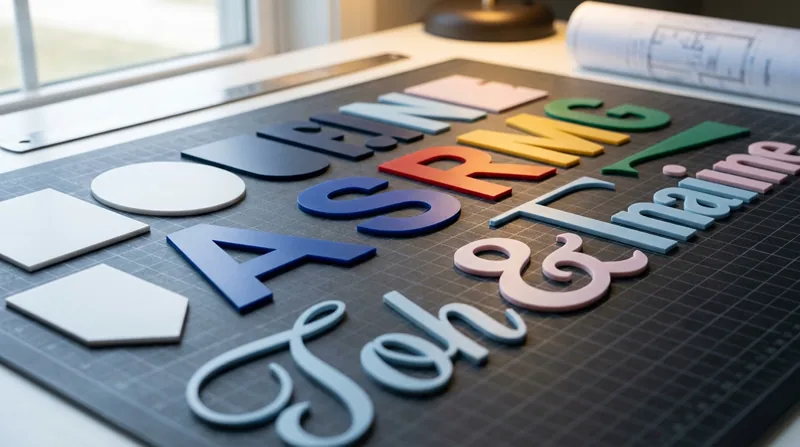
- ABS letters: as an abs letter cutting machine for sign making, the DCT handles serifs and scripts the router would round off. Drag-cut thin ABS letters for lobby signage, wayfinding, and retail nameplates.
- POS displays: shelf talkers, price tags, and display skins cut cold and burr-free, ready to vinyl or paint.
- Exhibition parts: lightweight exhibition panels and brackets where thermoformable ABS saves freight and on-site handling.
A typical order runs like this: a sign shop receives a lobby-letter proof, adjusts the font in the file, and cuts the revised set the same afternoon. No die, no downtime, no re-quoted lead time.
For related workflows across more materials and part types, see our signage and display cutting solutions.
Frequently Asked Questions (FAQ)
Q1: Can an ABS plastic cutting machine cut ABS without melting it?
A: Yes. The LDCUT DCT drag-cut head plus the standard EOT oscillating knife cut ABS mechanically, with no heat, so thin sheet does not melt or char.
Q2: What tool head do I need to cut thin ABS sheet (0.1–3 mm) on an LDCUT?
A: The DCT drag-cut head (360° rotation, no melting) paired with the standard EOT oscillating knife. The DCT follows tight radii and small serifs that a routed bit would round off.
Q3: Can a digital cutter handle thick or rigid ABS, or only thin sheet?
A: Beyond the drag-cut window, use the G6 spindle (standard) or an optional K/L spindle. The spindle must be specified before production and cannot be retrofitted later.
Q4: Is cutting ABS with a digital knife safer than laser cutting?
A: Yes. Laser-cutting ABS is widely documented to release hazardous fumes such as hydrogen cyanide. The LDCUT knife method produces no toxic fumes and needs no fume extraction.
Q5: Which LDCUT model should I choose for ABS sign production?
A: By capacity, not material: K8 and L8 for sampling and medium runs; L10 and K10 for automated, heavy-duty production. The head set stays the same across the K/L range.
Conclusion
ABS is a signage workhorse that common tools mishandle. Saws and lasers melt it. Lasers release documented toxic fumes. Dies tax every design change. An LDCUT abs plastic cutting machine cuts ABS sheet for signs with a DCT drag-cut head and the standard EOT knife, with no melting and no dies. Thin stock (0.1–3 mm) runs on the DCT; thicker rigid stock uses the G6 spindle or an optional K/L spindle specified before production. Choose by capacity: K8 and L8 for sampling and medium runs, L10 and K10 for automated heavy-duty work. As a 22-year manufacturer, LDCUT supports signage and POS converters in 80+ countries with this exact configuration.
Ready to spec the right machine? Walk through our digital cutting machine buying guide, or jump straight to the LDCUT tool lineup to compare heads, beds, and automation. For broader workflow ideas, revisit our signage and display cutting solutions.